
Counter and NFC
All the counter needs is a phone
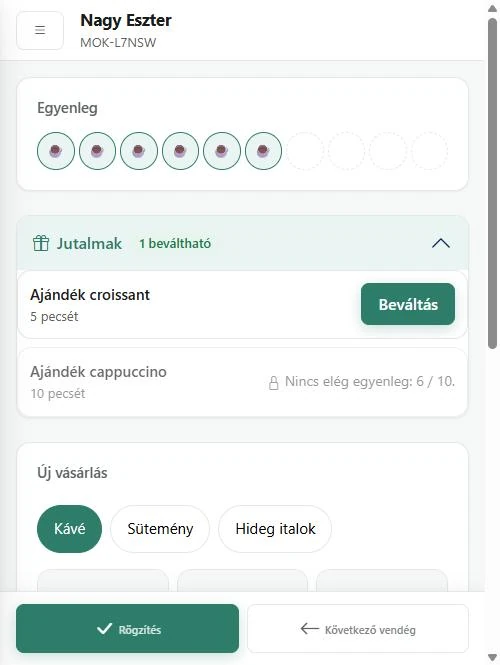
Staff scan the customer's card with their own phone or a tablet, record the purchase and redeem the reward. With an NFC Android phone it is a single tap.
- No app for your customers
- No card required
- A free plan that never expires
How it works
A purchase at the counter
-
You scan the card
The QR code with the phone's camera, or a single tap with an NFC Android phone. You can also search by name, e-mail, phone number or card number.
-
You record the purchase
Pick the products from the tiles, or just type in the total. The price always comes from your own product list.
-
The credit is there at once
The stamp or point is on the customer's card straight away, in Google Wallet too.
Details
What else the counter does
-
Redeeming a reward
The counter shows what can be redeemed now and how much is missing for the rest. Redeeming is one button.
-
A new customer at the counter
If the customer doesn't want to scan the QR code, you can sign them up with their e-mail address. They can collect straight away, and redeem once they have confirmed by e-mail.
-
Undoing a mistake
A purchase recorded by mistake can be voided: the balance is restored, and the record stays.
-
Never counted twice
If staff press the button twice or the connection stutters, the purchase is still recorded only once.
-
Staff with their own login
Owner, manager and staff roles; with several shops you can set who works where.
-
On the home screen
The counter and the dashboard can go on the phone's home screen, like an app.
Start at your counter today
Two minutes to sign up, no card required.
Do I need a till system or new hardware?
No. A phone or a tablet at the counter is enough: you scan the customer's card and record the products, or just the total. Your till stays as it is.
What if there's no internet?
The counter needs a connection: prices and balances are always read fresh, and nothing is stored on the device.
I have several shops. Does it work in all of them?
Yes. You pick the shop at the counter, the purchase is recorded there, and earning rules can differ from shop to shop.
What can a staff member see?
The counter: the balance and rewards of the customer they are serving. The customer list, the programme and the settings are for the owner and managers.
Features